

TL;DR
Claude Design is Anthropic’s new AI-powered visual tool that generates prototypes, slide decks, wireframes, and marketing assets through natural language conversation. It launched on April 17, 2026, runs on Claude Opus 4.7, and is available in research preview for Claude Pro, Max, Team, and Enterprise subscribers. It has its own separate usage tracking and weekly allowance that doesn’t touch your regular Claude limits. The design community’s reaction has been mixed, and honestly, the “Figma killer” narrative that’s been circulating is more hype than reality. But that doesn’t mean Claude Design isn’t worth paying attention to.
If you’ve been online in the last week, you’ve probably seen the discourse around Claude Design. Everybody has an opinion, half the takes are either panic or dismissal, and it can be hard to figure out what this tool actually is and what it means for you. So let’s break it all down, from what Claude Design is and how it works, to what it costs and what the design community is really saying about it.
What Is Claude Design?
Claude Design is a new product from Anthropic, the AI company behind the Claude model. It launched on April 17, 2026, as part of Anthropic Labs, the company’s experimental product division, and it’s currently available in research preview. The tool is powered by Claude Opus 4.7, Anthropic’s most capable vision model, which also launched the same day.
The core idea behind Claude Design is that you can create visual work through conversation. You describe what you want, and Claude Design produces a first draft. The types of outputs it can generate include interactive prototypes, slide decks, wireframes, landing pages, UI flows, and marketing assets. Essentially: anything visual that you might previously have needed a design tool or a designer to produce.
Anthropic’s own positioning is pretty clear about who this is for. They told TechCrunch it was built for people who aren’t starting from a design tool and need to get from an idea to something visual quickly. That framing matters, and we’ll come back to it. But it also says something about what clients actually expect from your deliverables versus what a quick AI-generated visual can provide.

How Does Claude Design Work?
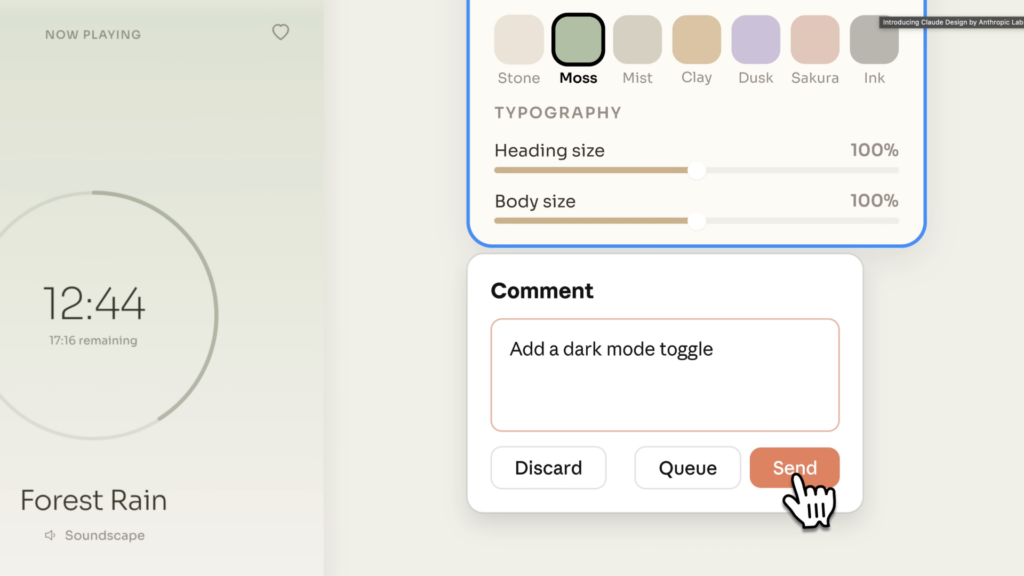
The workflow is designed to feel iterative and conversational. You start with a prompt describing what you want to make, Claude Design produces a first draft, and then you refine from there. The editing experience has a few different modes: you can leave inline comments to request specific tweaks, use custom sliders to adjust things like color and type size in real time, or make direct edits to the output yourself.
One of the more interesting features is the design system onboarding. When a team first sets up Claude Design, they can upload their existing codebase and design files. Claude Design reads that information and automatically builds a design system, pulling your brand colors, typography, and component patterns and applying them to every project going forward. Teams can maintain more than one design system and refine them over time. For developer-heavy teams that have been struggling to keep internal tools visually consistent without a dedicated designer, that’s a genuinely useful capability.
Once a design is finished, you have a few export options: Canva, PDF, PPTX, or standalone HTML. You can also share it as an internal URL within your organization. The Canva export is part of a formal partnership between Anthropic and Canva: Claude Design actually runs on Canva’s visual engine, so anything you create moves into Canva as a fully editable, collaborative file.
What Can Claude Design Actually Create?
Here’s a more specific breakdown of the output types Claude Design supports:
- Interactive prototypes: You can turn static mockups into shareable, clickable prototypes for user testing without needing code review or developer involvement.
- Slide decks and presentations: Go from a rough outline to a complete deck and export it as a PPTX or send it directly to Canva.
- Wireframes and UI flows: Product managers and developers can sketch out feature flows and hand them off to a developer or designer for refinement.
- Landing pages and marketing assets: Social media graphics, campaign visuals, and landing pages are all within scope.
The tool handles all of these through the same conversational workflow, so the interface is consistent regardless of what you’re making.
Who Can Access Claude Design and What Does It Cost?
Claude Design is currently available in research preview for Claude Pro, Max, Team, and Enterprise subscribers. Enterprise organizations also require admin enablement before their team can access it.
Pricing-wise, Claude Design is metered separately from the rest of your Claude usage. It has its own weekly allowance that resets every seven days and does not draw from your regular chat or Claude Code limits. Extra usage is available for purchase if you exceed your allowance.
According to Anthropic’s support documentation, the plan tiers break down roughly like this: Pro is positioned for quick explorations and one-off use, Max 5x suits semi-regular use for PMs and engineers producing regular mockups, and Max 20x is aimed at power users like designers and creatives. On the Team plan, Standard seats cover one-off use and Premium seats are for power users.
There is no standalone free tier for Claude Design specifically.

What Makes Claude Design Different From Other AI Design Tools?
There are already a handful of AI-assisted design tools out there, so it’s worth asking what Claude Design actually brings that’s different.
The design system onboarding is probably the most distinctive feature. Most AI design tools start from a blank slate every time. Claude Design’s ability to read your existing codebase and files and build a persistent, reusable design system from them is a meaningful differentiator, especially for teams.
The conversational editing experience is also more developed than what you typically get. Being able to say “make this look more trustworthy” or “add more visual hierarchy to the pricing section” and have the tool adjust weights, sizes, spacing, and color in a single response is a different kind of interaction than most visual tools offer.
And the Canva partnership gives it a real output destination. Rather than generating something you have to manually recreate elsewhere, Claude Design hands off directly to a tool where your team can already collaborate and publish.
My Take
Okay, so here’s where I land on Claude Design after spending time with the research and the coverage.
The tool is genuinely interesting for what it is. The design system feature is clever. The Canva handoff makes sense. For a founder building their first product, a developer who needs a quick mockup, or a marketing team that needs something visual for an internal presentation, Claude Design removes a real barrier. That’s not nothing.
But the “Figma killer” narrative that’s been flying around? I’m not buying it, and I don’t think you should either.
Figma gives you precision. It gives you a component library you can actually maintain, proper auto-layout, constraints, prototyping logic, and developer handoff that connects to how a product actually gets built. Claude Design doesn’t have any of that. And those aren’t small gaps. They’re the things that make design work possible at a professional level.
Anthropic themselves said this was built for people who aren’t starting from a design tool. That tells you a lot. The positioning isn’t “better than Figma.” It’s “useful when there’s no designer in the room.” Those are completely different value propositions and they’re aimed at completely different people.
Where I think you should actually pay attention is in the lower-stakes, quick-turnaround work. If someone used to hire out for a basic internal deck or a rough landing page for a beta product, there’s a real chance they might try Claude Design now instead. That’s worth knowing, not because it threatens your main work, but because it does shift where the bar is for certain types of tasks. It’s also a good reason to make sure you’re clear on how to price your design services in a way that reflects the strategic value you bring, not just the output.
The answer to that isn’t to worry. It’s to stay clear on what you bring that a prompt can’t: the strategy, the visual thinking, the ability to understand a brand’s personality and translate it into something that actually connects with real people. And the way you present that thinking, in something like a brand presentation, is also not something Claude Design can replicate for you.
What the Design Community Is Saying
The community reaction to Claude Design has been genuinely split, and more nuanced than the hot takes on Twitter would suggest.
On Hacker News, the thread when Claude Design dropped hit 662 points and 449 comments within six hours. The discussion landed in two camps. Some people praised the practical value for MVPs and internal tools, with one comment comparing it to using a drill press instead of hand tools for work that’s necessary but not the interesting part. Others pushed back on what AI-generated design does to skill development and design quality over time. One critical take that stuck with me was the idea that design is fundamentally about understanding and rationalizing the forces that define a problem, not tool usage, and that AI skipping straight to output bypasses the essential understanding that makes design work actually good.
On Reddit, the highest-voted comment in the main Claude Design discussion thread called the market reaction an overreaction. Not out of loyalty to Figma, but because people who actually use design tools day-to-day could immediately see the gap between what Claude Design produces and what professional design requires. One designer put it plainly: “Anyone who’s worked with a quality designer can easily tell that this isn’t up to mark yet.”
The comparison that keeps coming up in the more measured takes is this: Claude Design is for “I need a quick mockup.” Figma is for “I need to ship a product with a team.” Those workflows don’t really overlap, and people who understand both tools can see that clearly.
The broader concern in the community isn’t really about job replacement right now. It’s more philosophical: what happens to design skill and design thinking when teams start defaulting to generated output for even low-stakes work? That’s a legitimate question and one worth tracking as the tool develops.
For context on where this tool is headed: Anthropic brought on Mike Krieger, the Instagram co-founder, to lead product at their Labs division. That’s not a signal of a company treating this as a side experiment. Claude Design is a research preview right now and it’s going to get better. How much better, and how quickly, is worth keeping an eye on.
Next Steps: Start This Week
Since Claude Design is currently in research preview, here’s how to actually engage with it this week rather than just reading about it:
If you’re already on a Claude Pro, Max, Team, or Enterprise plan, you have access. Go into Claude and look for the Claude Design feature to see what your current plan’s weekly allowance includes.
Try it for a task you’d normally do quickly and without a lot of creative investment: an internal presentation, a rough wireframe to communicate an idea to a client, or a quick social graphic. Get a feel for the output quality firsthand rather than relying on other people’s demos.
Notice where it falls short for your use cases specifically. The gap between Claude Design output and what you’d deliver professionally is your value proposition made visible. That’s useful information to have documented and ready when clients ask you about AI tools.
Frequently Asked Questions
What is Claude Design?
Claude Design is an AI-powered visual tool from Anthropic that lets you create prototypes, slide decks, wireframes, and marketing assets through natural language conversation. It launched on April 17, 2026, and is currently in research preview for Claude Pro, Max, Team, and Enterprise subscribers.
Does Claude Design replace Figma?
No. Anthropic positioned it as a tool for people who aren’t starting from a design tool. It lacks the precision, component libraries, auto-layout, constraints, and developer handoff that professional design work requires. The use cases don’t significantly overlap.
How much does Claude Design cost?
Claude Design is included with Claude Pro, Max, Team, and Enterprise plans, but it’s metered separately from regular chat usage. It has its own weekly allowance that resets every seven days. Extra usage is available for purchase. There is no standalone free tier.
What can Claude Design create?
Interactive prototypes, slide decks, wireframes, landing pages, UI flows, and marketing assets. All outputs can be exported to Canva, PDF, PPTX, or standalone HTML, or shared as an internal organization URL.
What is the Claude Design and Canva connection?
Claude Design runs on Canva’s visual engine as part of a formal partnership. Anything created in Claude Design can be exported directly to Canva as a fully editable, collaborative file.
Who is Claude Design actually built for?
Primarily founders, developers, product managers, and non-designer team members who need to go from an idea to something visual quickly. It’s not aimed at designers who already have a professional workflow in a dedicated design tool.
Is Claude Design available on the free Claude plan?
No. Access currently requires a paid Claude subscription: Pro, Max, Team, or Enterprise. Enterprise organizations also require admin enablement.
What makes Claude Design different from other AI design tools?
The design system onboarding feature is the main differentiator. Claude Design reads your team’s existing codebase and design files during setup and automatically builds and applies a design system with your brand’s actual colors, typography, and components to every project going forward.